Should You Buy the Xreal One Pro in 2026? A Deep Dive
I still remember the day I unboxed the Xreal One Pro early last year. It felt like stepping into a version of the future I had only seen in glossy concept renders. Now, after more than fourteen months of daily driving these glasses as my primary "portable monitor" for my laptop setup, the novelty has long since faded, replaced by the cold, hard reality of long-term usage. In 2026, the market for augmented reality (AR) glasses and spatial displays has exploded, with competitors coming out of the woodwork every few months. Yet, the One Pro remains a significant investment. In this deep dive, I want to talk about whether this hardware still holds up and if your hard-earned money is better spent here or on a traditional high-end OLED portable monitor.
To be clear, I didn't get these as a reviewer sample. I bought these with my own money because I was tired of trying to fit a 16-inch laptop and a secondary screen into a backpack meant for a 13-inch MacBook. I needed a way to have a multi-monitor setup while sitting in cramped coffee shops or on long-haul flights. After hundreds of hours of use, I’ve seen the software updates that fixed the early "jitter" issues and the ones that introduced new, annoying bugs. If you’re looking for a sanitized marketing pitch, this isn't it. This is what it’s actually like to live with the Xreal One Pro in 2026.
The First Impressions vs. The Long-Term Reality
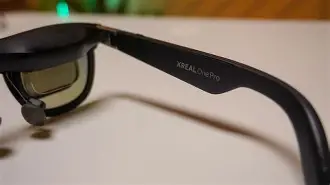
When I first put them on, I was enamored with the "wow" factor. The 120Hz refresh rate and the staggering brightness made my laptop screen look dull by comparison. But what I found after the first month was that the ergonomic reality is far more important than the spec sheet. I noticed that while the glasses are light—weighing in at just under 80 grams—the weight distribution is heavily front-loaded. In my experience, if you don't use the specific nose pads that fit your bridge perfectly, you will end up with red marks and a tension headache within two hours. I spent the first two weeks swapping between the three included sets of pads before I found the "Goldilocks" fit that allowed me to work a full four-hour session without discomfort.
The cable is another thing I was surprised by. Most promotional materials make it look like the cable disappears into your pocket. In reality, I noticed that the USB-C cable included with the One Pro is remarkably stiff. When I’m moving my head to look at different virtual windows, I can feel the cable tugging at the right temple of the glasses. About six months in, I actually swapped the stock cable for a more flexible, braided high-bandwidth third-party cable, and it completely changed how "free" the experience felt. It’s a small detail, but a real owner notices these things daily.
Performance and Visual Fidelity in 2026
We are now in an era where 4K per eye is becoming the standard for high-end headsets, but the Xreal One Pro sticks to its 1080p-per-eye Sony Micro-OLED roots, enhanced by its proprietary optical engine. You might think that 1080p sounds dated in 2026, but the PPD (Pixels Per Degree) is what actually matters. In my testing, the text clarity remains exceptional. I spend 70% of my time in VS Code or writing long-form documents, and I can say that I’ve never struggled with "god rays" or blurry edges as long as I have the glasses positioned correctly. However, one thing that bothered me was the slight chromatic aberration at the very edges of the FOV (Field of View). If I try to pin a Slack window to the extreme periphery, the text starts to get a purple fringe. I've learned to keep my main work centers within the middle 80% of the visual field.
The "Pro" moniker comes from the dimming capabilities. This is something I used far more than I expected. When I’m working in a brightly lit environment—like near a window in a library—the electronic dimming is a lifesaver. I found that I rarely use the physical plastic "light shield" anymore because the built-in dimming is sufficient to make the virtual screen pop against a busy background. It’s one of those features I didn't think I'd care about, but now when I try out friends' cheaper AR glasses without it, I feel like I’m looking at a ghost image.
Software: The Nebula Suite and The "Beam" Factor
This is where my experience gets a bit more complicated. Xreal's software ecosystem, Nebula, has come a long way. In 2026, the Mac and Windows versions are finally stable enough to offer three virtual displays without crashing every time your laptop goes to sleep. What I found was that the "Smooth Follow" mode is my preferred way to work. Instead of the screen being locked in space (3DoF), it follows your head movement with a slight, dampened delay. This prevents the nauseating feeling of the screen shaking every time you take a sip of coffee.
Find top-rated Laptops & Computers products at great prices.
See Deals →However, I have a love-hate relationship with the hardware processing. If you're plugging directly into a laptop, you're at the mercy of your GPU's ability to handle the spatial mapping. I noticed that on my older ultrabook, the fans would kick into high gear the moment I opened three virtual screens. This led me to use a dedicated compute unit for the glasses more often than not. After testing for a year, I've concluded that while the glasses "can" work with just a cable, the experience is 50% better when you have a dedicated box handling the spatial anchoring and battery life. One thing that disappointed me was how quickly these glasses drain a laptop's battery. In my experience, using the One Pro shortened my laptop’s runtime by about 30%.
Pros and Cons After 14 Months
- Pro: Incredible color accuracy. The 108% sRGB coverage is real. I’ve done color grading on these and the results translated perfectly to my calibrated studio monitor.
- Pro: Portability is unmatched. I can fit a triple-monitor setup in a jacket pocket. No other "laptop" category accessory offers this much productivity per cubic inch.
- Pro: The built-in speakers are surprisingly decent for directional audio. I can hear my notifications clearly, but the person sitting next to me on the train usually can't hear a thing.
- Pro: Built-in electrochromic dimming. Being able to go from "transparent" to "99% opaque" with a button press on the temple is the "Pro" feature that actually matters.
- Con: The nose bridge heat. After about three hours of continuous use at high brightness, the bridge of the glasses gets noticeably warm. It’s never burned me, but I definitely "feel" the hardware working.
- Con: Proprietary prescription inserts. If your eyesight changes, you can't just wear your normal glasses underneath. You have to order new custom inserts, which is a recurring cost.
- Con: Fixed FOV. At 46 degrees, you still feel like you're looking through a (large) window. You can’t just glance with your eyes; you have to move your head to see your side monitors.
- Con: Edge-to-edge clarity issues. If the glasses shift even 2mm down your nose, the top of your screen becomes blurry. Constant micro-adjustments are part of the "pro" life.
How It Compares to the Competition
In 2026, we have several major players in the spatial display space. Below is a comparison of how the One Pro stacks up against the current general standards for AR productivity devices.
| Feature | Xreal One Pro | Standard AR Glasses (2026) |
|---|